> ## Documentation Index
> Fetch the complete documentation index at: https://stagehand.readme-i18n.com/llms.txt
> Use this file to discover all available pages before exploring further.
# Telemetry and Evaluations
> How to view LLM usage and run evals on your Stagehand workflows.
Check out the [Stagehand Evals](https://www.stagehand.dev/evals) to see different LLMs compare in Stagehand.
## View LLM usage and token counts
You can view your token usage at any point with `stagehand.metrics`.
```typescript TypeScript theme={null}
console.log(stagehand.metrics);
```
```python Python theme={null}
print(stagehand.metrics)
```
This will return an object with the following shape:
```typescript TypeScript theme={null}
{
actPromptTokens: 4011,
actCompletionTokens: 51,
actInferenceTimeMs: 1688,
extractPromptTokens: 4200,
extractCompletionTokens: 243,
extractInferenceTimeMs: 4297,
observePromptTokens: 347,
observeCompletionTokens: 43,
observeInferenceTimeMs: 903,
totalPromptTokens: 8558,
totalCompletionTokens: 337,
totalInferenceTimeMs: 6888
}
```
```python Python theme={null}
{
"act_prompt_tokens": 4011,
"act_completion_tokens": 51,
"act_inference_time_ms": 1688,
"extract_prompt_tokens": 4200,
"extract_completion_tokens": 243,
"extract_inference_time_ms": 4297,
"observe_prompt_tokens": 347,
"observe_completion_tokens": 43,
"observe_inference_time_ms": 903,
"total_prompt_tokens": 8558,
"total_completion_tokens": 337,
"total_inference_time_ms": 6888
}
```
### View granular LLM usage
You can set `logInferenceToFile: true` in the Stagehand constructors. This will dump all act, extract, and observe calls to a directory called `inference_summary`.
You can set `log_inference_to_file=True` in the Stagehand config. This will dump all act, extract, and observe calls to a directory called `inference_summary`.
`inference_summary` will have the following structure:
```
inference_summary/
├── act_summary/
│ ├── {timestamp}.json
│ ├── {timestamp}.json
│ └── ...
│ └── act_summary.json
├── extract_summary/
│ ├── {timestamp}.json
│ ├── {timestamp}.json
│ └── ...
│ └── extract_summary.json
├── observe_summary/
│ ├── {timestamp}.json
│ ├── {timestamp}.json
│ └── ...
│ └── observe_summary.json
```
Each of these files will have the following shape:
```typescript theme={null}
{
"act_summary": [
{
"act_inference_type": "act",
"timestamp": "20250329_080446068",
"LLM_input_file": "20250329_080446068_act_call.txt",
"LLM_output_file": "20250329_080447019_act_response.txt",
"prompt_tokens": 3451,
"completion_tokens": 45,
"inference_time_ms": 951
},
...
],
}
```
## Run Evaluations (Evals)
Stagehand evaluations are how we, the Stagehand team, test the validity of Stagehand itself.
To run evals, you'll need to clone the [Stagehand repo](https://github.com/browserbase/stagehand) and run `npm install` to install the dependencies.
We have three types of evals:
1. **Deterministic Evals** - These are evals that are deterministic and can be run without any LLM inference.
2. **LLM-based Evals** - These are evals that test the underlying functionality of Stagehand's AI primitives.
### Deterministic Evals
To run deterministic evals, you can just run `npm run e2e` from within the Stagehand repo. This will test the functionality of Playwright within Stagehand to make sure it's working as expected.
These tests are in [`evals/deterministic`](https://github.com/browserbase/stagehand/tree/main/evals/deterministic) and test on both Browserbase browsers and local headless Chromium browsers.
### LLM-based Evals
To run LLM evals, you'll need a [Braintrust account](https://www.braintrust.dev/docs/).
To run LLM-based evals, you can run `npm run evals` from within the Stagehand repo. This will test the functionality of the LLM primitives within Stagehand to make sure they're working as expected.
Evals are grouped into three categories:
1. **Act Evals** - These are evals that test the functionality of the `act` method.
2. **Extract Evals** - These are evals that test the functionality of the `extract` method.
3. **Observe Evals** - These are evals that test the functionality of the `observe` method.
4. **Combination Evals** - These are evals that test the functionality of the `act`, `extract`, and `observe` methods together.
#### Configuring and Running Evals
You can view the specific evals in [`evals/tasks`](https://github.com/browserbase/stagehand/tree/main/evals/tasks). Each eval is grouped into eval categories based on [`evals/evals.config.json`](https://github.com/browserbase/stagehand/blob/main/evals/evals.config.json). You can specify models to run and other general task config in [`evals/taskConfig.ts`](https://github.com/browserbase/stagehand/blob/main/evals/taskConfig.ts).
To run a specific eval, you can run `npm run evals `, or run all evals in a category with `npm run evals category `.
#### Viewing eval results
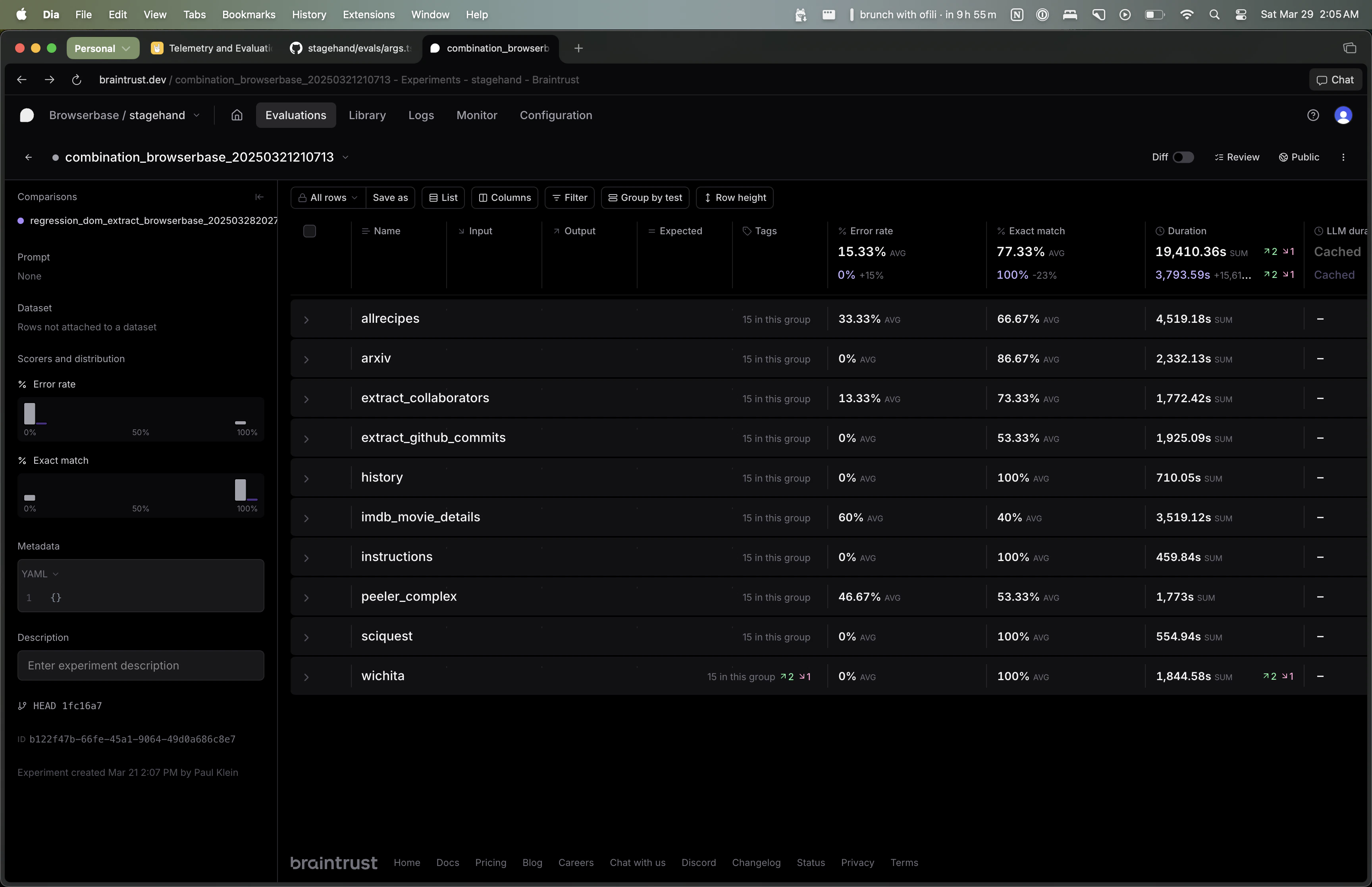 Eval results are viewable on Braintrust. You can view the results of a specific eval by going to the Braintrust URL specified in the terminal when you run `npm run evals`.
By default, each eval will run five times per model. The "Exact Match" column shows the percentage of times the eval was correct. The "Error Rate" column shows the percentage of times the eval errored out.
You can use the Braintrust UI to filter by model/eval and aggregate results across all evals.
#### Adding new evals
To add a new eval, you can create a new file in [`evals/tasks`](https://github.com/browserbase/stagehand/tree/main/evals/tasks) and add it to the appropriate category in [`evals/evals.config.json`](https://github.com/browserbase/stagehand/blob/main/evals/evals.config.json).
Eval results are viewable on Braintrust. You can view the results of a specific eval by going to the Braintrust URL specified in the terminal when you run `npm run evals`.
By default, each eval will run five times per model. The "Exact Match" column shows the percentage of times the eval was correct. The "Error Rate" column shows the percentage of times the eval errored out.
You can use the Braintrust UI to filter by model/eval and aggregate results across all evals.
#### Adding new evals
To add a new eval, you can create a new file in [`evals/tasks`](https://github.com/browserbase/stagehand/tree/main/evals/tasks) and add it to the appropriate category in [`evals/evals.config.json`](https://github.com/browserbase/stagehand/blob/main/evals/evals.config.json).