> ## Documentation Index
> Fetch the complete documentation index at: https://stagehand.readme-i18n.com/llms.txt
> Use this file to discover all available pages before exploring further.
# 与网站交互
> 您可以使用 Stagehand 通过 AI 智能地与网站进行交互
## 执行操作
Stagehand 提供了 `act()` 函数,可通过自然语言在页面上执行操作。以下是使用 Stagehand 在 LinkedIn 上查找工作的示例:
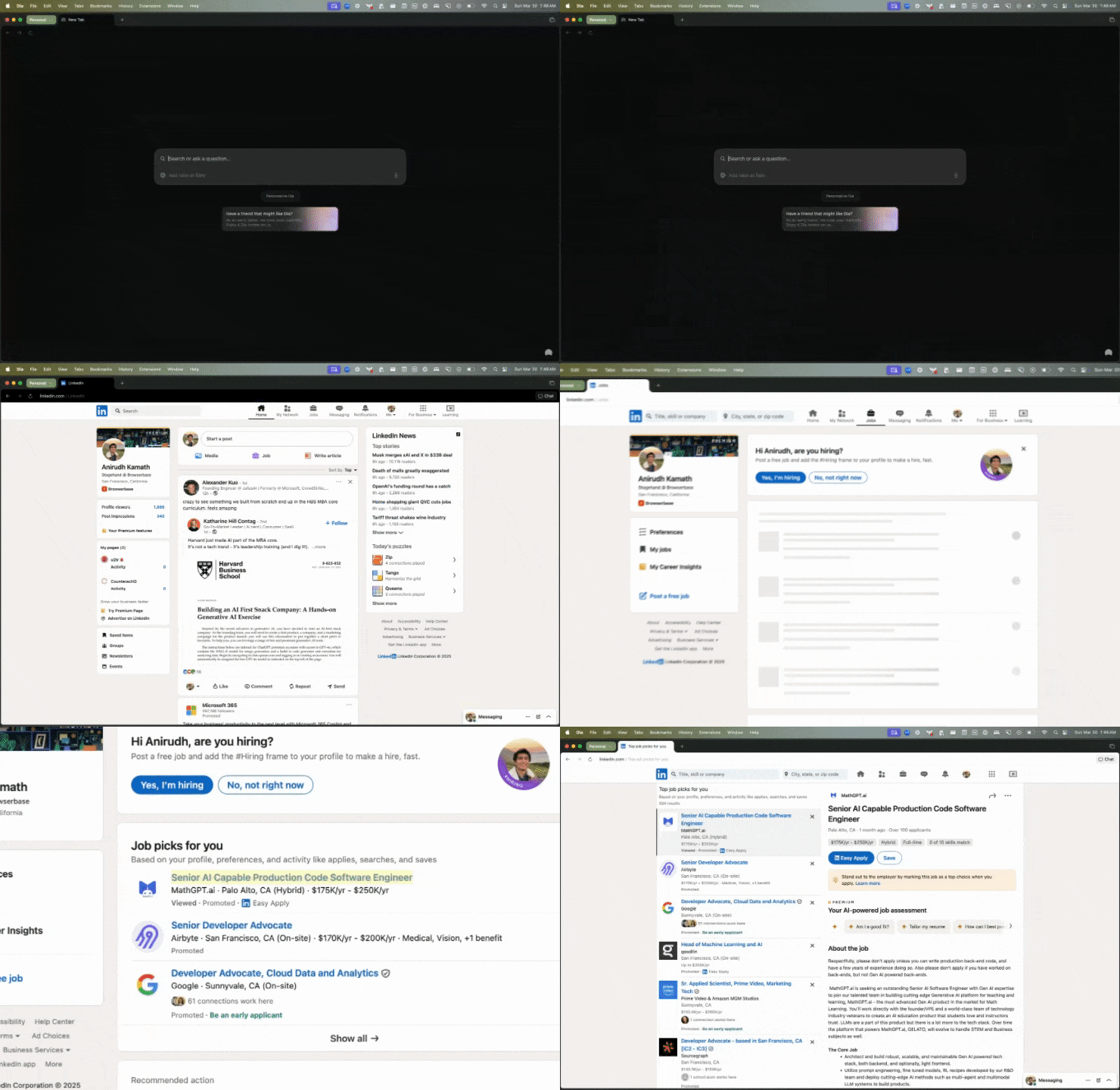 该工作流程仅需如下几行代码即可实现:
```typescript TypeScript theme={null}
const page = stagehand.page
// Navigate to the URL
await page.goto("https://linkedin.com");
// Click on jobs menu selection
await page.act("click 'jobs'");
// Click on first posting
await page.act("click the first job posting");
```
```python Python theme={null}
page = stagehand.page
# Navigate to the URL
await page.goto("https://linkedin.com")
# Click on jobs menu selection
await page.act("click 'jobs'")
# Click on first posting
await page.act("click the first job posting")
```
`page` 对象扩展自 Playwright 的页面对象,因此您可以使用任何 [Playwright 页面方法](https://playwright.dev/docs/api/class-page)。
## 从页面提取结构化数据
您可以使用 `extract()` 从页面获取结构化数据。
以下是提取职位发布中职位名称的示例:
```typescript TypeScript theme={null}
const { jobTitle } = await page.extract({
instruction: "Extract the job title from the job posting",
schema: z.object({
jobTitle: z.string(),
}),
});
```
```python Python theme={null}
result = await page.extract("Extract the job title from the job posting")
```
Stagehand 使用 [Zod](https://zod.dev/)(针对 TypeScript)和 [Pydantic](https://docs.pydantic.dev/)(针对 Python)来帮助定义待提取数据的模式。
## 预览/缓存操作
有时您希望在执行操作前进行预览。可在调用 `act()` 前使用 `page.observe()` 实现。
```typescript TypeScript theme={null}
const [action] = await page.observe("click 'jobs'");
console.log("Going to execute action:", action)
// You can add extra logic here to validate/cache the action
await page.act(action)
```
```python Python theme={null}
actions = await page.observe("click 'jobs'")
action = actions[0]
print("Going to execute action:", action)
# You can add extra logic here to validate/cache the action
await page.act(action)
```
`action` 将是一个描述待执行操作的 JSON 对象。
```TypeScript theme={null}
// action is a JSON-ified version of a Playwright action:
{
description: "The jobs link",
method: "click",
selector: "/html/body/div[1]/div[1]/a",
arguments: [],
}
```
有关缓存的更多信息,请参阅[缓存文档](/examples/caching)。
## 可以执行哪些操作?
Stagehand 将自然语言映射到 [Playwright](https://playwright.dev) 操作。
我们通常支持以下操作:
| Action | Description |
| ---------------- | -------------------- |
| `scrollIntoView` | 将元素滚动到浏览器窗口的可见区域 |
| `scrollTo` | 滚动到页面高度的特定百分比位置 |
| `fill` | 用指定文本填充表单字段 |
| `type` | 在输入框中输入文本(`fill`的别名) |
| `press` | 模拟按下键盘按键 |
| `click` | 点击匹配指定选择器的元素 |
| `nextChunk` | 按视口高度的100%进行滚动 |
| `prevChunk` | 按视口高度的-100%进行滚动 |
这些操作都可以通过自然语言命令触发。例如:
```typescript TypeScript theme={null}
await page.act("scroll to the bottom of the page")
await page.act("fill in the username field with 'john_doe'")
await page.act("scroll the modal to the next chunk")
```
```python Python theme={null}
await page.act("scroll to the bottom of the page")
await page.act("fill in the username field with 'john_doe'")
await page.act("scroll the modal to the next chunk")
```
该工作流程仅需如下几行代码即可实现:
```typescript TypeScript theme={null}
const page = stagehand.page
// Navigate to the URL
await page.goto("https://linkedin.com");
// Click on jobs menu selection
await page.act("click 'jobs'");
// Click on first posting
await page.act("click the first job posting");
```
```python Python theme={null}
page = stagehand.page
# Navigate to the URL
await page.goto("https://linkedin.com")
# Click on jobs menu selection
await page.act("click 'jobs'")
# Click on first posting
await page.act("click the first job posting")
```
`page` 对象扩展自 Playwright 的页面对象,因此您可以使用任何 [Playwright 页面方法](https://playwright.dev/docs/api/class-page)。
## 从页面提取结构化数据
您可以使用 `extract()` 从页面获取结构化数据。
以下是提取职位发布中职位名称的示例:
```typescript TypeScript theme={null}
const { jobTitle } = await page.extract({
instruction: "Extract the job title from the job posting",
schema: z.object({
jobTitle: z.string(),
}),
});
```
```python Python theme={null}
result = await page.extract("Extract the job title from the job posting")
```
Stagehand 使用 [Zod](https://zod.dev/)(针对 TypeScript)和 [Pydantic](https://docs.pydantic.dev/)(针对 Python)来帮助定义待提取数据的模式。
## 预览/缓存操作
有时您希望在执行操作前进行预览。可在调用 `act()` 前使用 `page.observe()` 实现。
```typescript TypeScript theme={null}
const [action] = await page.observe("click 'jobs'");
console.log("Going to execute action:", action)
// You can add extra logic here to validate/cache the action
await page.act(action)
```
```python Python theme={null}
actions = await page.observe("click 'jobs'")
action = actions[0]
print("Going to execute action:", action)
# You can add extra logic here to validate/cache the action
await page.act(action)
```
`action` 将是一个描述待执行操作的 JSON 对象。
```TypeScript theme={null}
// action is a JSON-ified version of a Playwright action:
{
description: "The jobs link",
method: "click",
selector: "/html/body/div[1]/div[1]/a",
arguments: [],
}
```
有关缓存的更多信息,请参阅[缓存文档](/examples/caching)。
## 可以执行哪些操作?
Stagehand 将自然语言映射到 [Playwright](https://playwright.dev) 操作。
我们通常支持以下操作:
| Action | Description |
| ---------------- | -------------------- |
| `scrollIntoView` | 将元素滚动到浏览器窗口的可见区域 |
| `scrollTo` | 滚动到页面高度的特定百分比位置 |
| `fill` | 用指定文本填充表单字段 |
| `type` | 在输入框中输入文本(`fill`的别名) |
| `press` | 模拟按下键盘按键 |
| `click` | 点击匹配指定选择器的元素 |
| `nextChunk` | 按视口高度的100%进行滚动 |
| `prevChunk` | 按视口高度的-100%进行滚动 |
这些操作都可以通过自然语言命令触发。例如:
```typescript TypeScript theme={null}
await page.act("scroll to the bottom of the page")
await page.act("fill in the username field with 'john_doe'")
await page.act("scroll the modal to the next chunk")
```
```python Python theme={null}
await page.act("scroll to the bottom of the page")
await page.act("fill in the username field with 'john_doe'")
await page.act("scroll the modal to the next chunk")
```