> ## Documentation Index
> Fetch the complete documentation index at: https://stagehand.readme-i18n.com/llms.txt
> Use this file to discover all available pages before exploring further.
# 构建网页浏览智能体
> 使用Stagehand构建能自主控制浏览器的AI智能体
export const Excalidraw = ({url, className = "w-full"}) => {
return <>
;
};
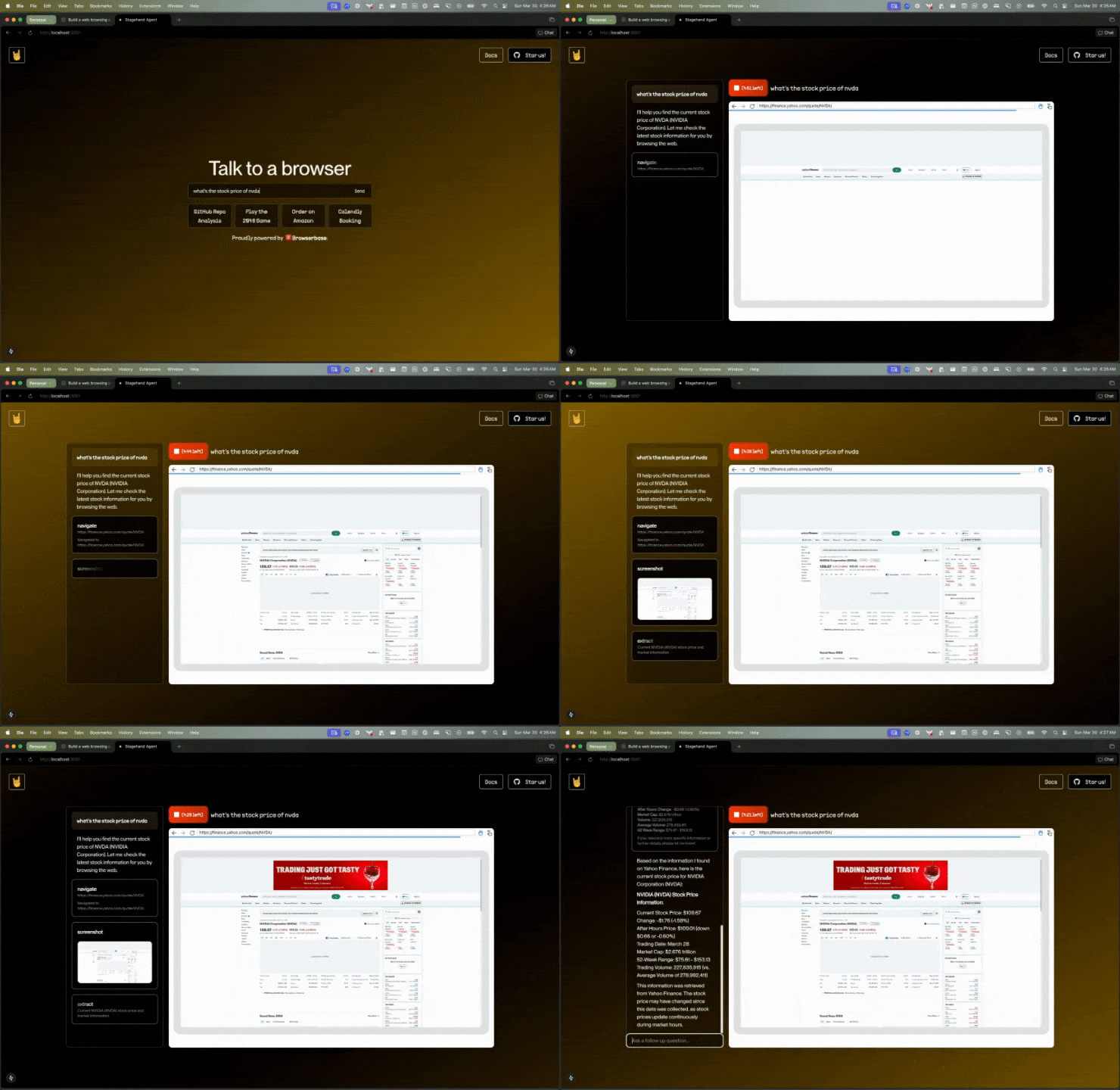
Stagehand为AI智能体提供了强大的工具,使其能够完全自主地控制浏览器。观看下方演示,Stagehand智能体自主导航至URL,在页面上执行操作,并提取结构化数据来回答问题。
使用Stagehand构建智能体有多种方式,下面我们将介绍其中几种。
 ## Stagehand MCP
上述示例是一个使用Stagehand控制浏览器的Claude智能体。截至本文撰写时,[多模态工具调用](https://sdk.vercel.ai/docs/ai-sdk-core/tools-and-tool-calling#multi-modal-tool-results)功能仅在Claude 3.5/3.7 Sonnet版本中支持。
这意味着Claude具备足够的智能来判断何时需要请求浏览器截图,并能利用该截图决定下一步操作。
通过Stagehand驱动的Browserbase MCP控制浏览器
最令人惊叹的是,这个代理能够理解浏览器状态并执行相互独立的操作!
Claude 擅长分析浏览器状态,而 Stagehand 则能通过 GPT-4o-mini 或计算机使用模型在页面上执行操作。
Stagehand 甚至能智能判断何时使用 GPT-4o-mini,何时调用计算机使用模型(例如在检测到 iframe 时)。
我们通过让 Claude 作为"轨迹"代理在适当时调用 Stagehand 工具取得了显著成效!
虽然 MCP 仍处于早期阶段,但我们对它的发展前景充满期待。
## Stagehand + 计算机使用模型
Stagehand 只需一行代码就能调用 OpenAI 和 Anthropic 强大的计算机使用 API。
```typescript TypeScript theme={null}
await page.goto("https://github.com/browserbase/stagehand");
// Create a Computer Use agent with just one line of code!
const agent = stagehand.agent({
provider: "openai",
model: "computer-use-preview"
});
// Use the agent to execute a task
const result = await agent.execute("Extract the top contributor's username");
console.log(result);
```
```python Python theme={null}
await page.goto("https://github.com/browserbase/stagehand-python")
# Create a Computer Use agent with just one line of code!
agent = stagehand.agent(
model="computer-use-preview"
)
# Use the agent to execute a task
result = await agent.execute("Extract the top contributor's username")
print(result)
```
查看我们的文档页面,了解如何将计算机使用模型与 Stagehand 配合使用。
观看由 OpenAI 计算机使用代理 (CUA) 模型控制的 Browserbase 浏览器实时演示。
## 顺序工具调用 (Open Operator)
2025年1月,Browserbase发布了[Open Operator](https://operator.browserbase.com)。\
Open Operator能够理解浏览器状态并采取相应动作来完成"给我订个披萨"这类复杂任务。\
其工作原理是依次调用Stagehand工具:
1. 若无URL,则访问默认URL
2. 检查浏览器状态,请求LLM推理下一步操作
3. 使用`page.act()`执行LLM建议的动作
4. 循环执行
只需添加一行代码即可将`stagehand.agent`集成到浏览器自动化中:
Python当前支持通过计算机使用代理(CUA)模型调用`stagehand.agent`,默认实现即将推出。
```typescript TypeScript theme={null}
await stagehand.page.goto("https://github.com/browserbase/stagehand");
// Open Operator will use the default LLM from Stagehand config
const operator = stagehand.agent();
const { message, actions } = await operator.execute(
"Extract the top contributor's username"
);
console.log(message);
```
### 重放代理动作
您可以像使用常规Stagehand代理一样重放动作,甚至能自动缓存动作以避免重复运行时不必要的LLM调用。
下面使用`replay`函数将动作保存为Stagehand脚本文件,该文件将完全复现代理执行的动作,并内置缓存功能。
```typescript theme={null}
import { AgentAction, AgentResult } from "@browserbasehq/stagehand";
import { exec } from "child_process";
import fs from "fs/promises";
export async function replay(result: AgentResult) {
const history = result.actions;
const replay = history
.map((action: AgentAction) => {
switch (action.type) {
case "act":
if (!action.playwrightArguments) {
throw new Error("No playwright arguments provided");
}
return `await page.act(${JSON.stringify(
action.playwrightArguments
)})`;
case "extract":
return `await page.extract("${action.parameters}")`;
case "goto":
return `await page.goto("${action.parameters}")`;
case "wait":
return `await page.waitForTimeout(${parseInt(
action.parameters as string
)})`;
case "navback":
return `await page.goBack()`;
case "refresh":
return `await page.reload()`;
case "close":
return `await stagehand.close()`;
default:
return `await stagehand.oops()`;
}
})
.join("\n");
console.log("回放操作:");
const boilerplate = `
import { Page, BrowserContext, Stagehand } from "@browserbasehq/stagehand";
export async function main(stagehand: Stagehand) {
const page = stagehand.page
${replay}
}
`;
await fs.writeFile("replay.ts", boilerplate);
// 使用prettier格式化回放文件
await new Promise((resolve, reject) => {
exec(
"npx prettier --write replay.ts",
(error: any, stdout: any, stderr: any) => {
if (error) {
console.error(`格式化replay.ts时出错: ${error}`);
reject(error);
return;
}
resolve(stdout);
}
);
});
}
```
以下是类似指令 `"获取英伟达(NVDA)的股价"` 的回放输出:
```typescript {14-22} replay.ts theme={null}
import { Page, BrowserContext, Stagehand } from "@browserbasehq/stagehand";
export async function main({
page,
context,
stagehand,
}: {
page: Page; // Playwright Page with act, extract, and observe methods
context: BrowserContext; // Playwright BrowserContext
stagehand: Stagehand; // Stagehand instance
}) {
await page.goto("https://www.google.com");
// Replay will default to Playwright first to avoid unnecessary LLM calls!
// If the Playwright action fails, Stagehand AI will take over and self-heal
await page.act({
description: "The search combobox where users can type their queries.",
method: "fill",
arguments: ["NVDA stock price"],
selector:
"xpath=/html/body[1]/div[1]/div[3]/form[1]/div[1]/div[1]/div[1]/div[1]/div[2]/textarea[1]",
});
await page.extract(
"the displayed NVDA stock price in the search suggestions",
);
await stagehand.close();
}
```
## Stagehand MCP
上述示例是一个使用Stagehand控制浏览器的Claude智能体。截至本文撰写时,[多模态工具调用](https://sdk.vercel.ai/docs/ai-sdk-core/tools-and-tool-calling#multi-modal-tool-results)功能仅在Claude 3.5/3.7 Sonnet版本中支持。
这意味着Claude具备足够的智能来判断何时需要请求浏览器截图,并能利用该截图决定下一步操作。
通过Stagehand驱动的Browserbase MCP控制浏览器
最令人惊叹的是,这个代理能够理解浏览器状态并执行相互独立的操作!
Claude 擅长分析浏览器状态,而 Stagehand 则能通过 GPT-4o-mini 或计算机使用模型在页面上执行操作。
Stagehand 甚至能智能判断何时使用 GPT-4o-mini,何时调用计算机使用模型(例如在检测到 iframe 时)。
我们通过让 Claude 作为"轨迹"代理在适当时调用 Stagehand 工具取得了显著成效!
虽然 MCP 仍处于早期阶段,但我们对它的发展前景充满期待。
## Stagehand + 计算机使用模型
Stagehand 只需一行代码就能调用 OpenAI 和 Anthropic 强大的计算机使用 API。
```typescript TypeScript theme={null}
await page.goto("https://github.com/browserbase/stagehand");
// Create a Computer Use agent with just one line of code!
const agent = stagehand.agent({
provider: "openai",
model: "computer-use-preview"
});
// Use the agent to execute a task
const result = await agent.execute("Extract the top contributor's username");
console.log(result);
```
```python Python theme={null}
await page.goto("https://github.com/browserbase/stagehand-python")
# Create a Computer Use agent with just one line of code!
agent = stagehand.agent(
model="computer-use-preview"
)
# Use the agent to execute a task
result = await agent.execute("Extract the top contributor's username")
print(result)
```
查看我们的文档页面,了解如何将计算机使用模型与 Stagehand 配合使用。
观看由 OpenAI 计算机使用代理 (CUA) 模型控制的 Browserbase 浏览器实时演示。
## 顺序工具调用 (Open Operator)
2025年1月,Browserbase发布了[Open Operator](https://operator.browserbase.com)。\
Open Operator能够理解浏览器状态并采取相应动作来完成"给我订个披萨"这类复杂任务。\
其工作原理是依次调用Stagehand工具:
1. 若无URL,则访问默认URL
2. 检查浏览器状态,请求LLM推理下一步操作
3. 使用`page.act()`执行LLM建议的动作
4. 循环执行
只需添加一行代码即可将`stagehand.agent`集成到浏览器自动化中:
Python当前支持通过计算机使用代理(CUA)模型调用`stagehand.agent`,默认实现即将推出。
```typescript TypeScript theme={null}
await stagehand.page.goto("https://github.com/browserbase/stagehand");
// Open Operator will use the default LLM from Stagehand config
const operator = stagehand.agent();
const { message, actions } = await operator.execute(
"Extract the top contributor's username"
);
console.log(message);
```
### 重放代理动作
您可以像使用常规Stagehand代理一样重放动作,甚至能自动缓存动作以避免重复运行时不必要的LLM调用。
下面使用`replay`函数将动作保存为Stagehand脚本文件,该文件将完全复现代理执行的动作,并内置缓存功能。
```typescript theme={null}
import { AgentAction, AgentResult } from "@browserbasehq/stagehand";
import { exec } from "child_process";
import fs from "fs/promises";
export async function replay(result: AgentResult) {
const history = result.actions;
const replay = history
.map((action: AgentAction) => {
switch (action.type) {
case "act":
if (!action.playwrightArguments) {
throw new Error("No playwright arguments provided");
}
return `await page.act(${JSON.stringify(
action.playwrightArguments
)})`;
case "extract":
return `await page.extract("${action.parameters}")`;
case "goto":
return `await page.goto("${action.parameters}")`;
case "wait":
return `await page.waitForTimeout(${parseInt(
action.parameters as string
)})`;
case "navback":
return `await page.goBack()`;
case "refresh":
return `await page.reload()`;
case "close":
return `await stagehand.close()`;
default:
return `await stagehand.oops()`;
}
})
.join("\n");
console.log("回放操作:");
const boilerplate = `
import { Page, BrowserContext, Stagehand } from "@browserbasehq/stagehand";
export async function main(stagehand: Stagehand) {
const page = stagehand.page
${replay}
}
`;
await fs.writeFile("replay.ts", boilerplate);
// 使用prettier格式化回放文件
await new Promise((resolve, reject) => {
exec(
"npx prettier --write replay.ts",
(error: any, stdout: any, stderr: any) => {
if (error) {
console.error(`格式化replay.ts时出错: ${error}`);
reject(error);
return;
}
resolve(stdout);
}
);
});
}
```
以下是类似指令 `"获取英伟达(NVDA)的股价"` 的回放输出:
```typescript {14-22} replay.ts theme={null}
import { Page, BrowserContext, Stagehand } from "@browserbasehq/stagehand";
export async function main({
page,
context,
stagehand,
}: {
page: Page; // Playwright Page with act, extract, and observe methods
context: BrowserContext; // Playwright BrowserContext
stagehand: Stagehand; // Stagehand instance
}) {
await page.goto("https://www.google.com");
// Replay will default to Playwright first to avoid unnecessary LLM calls!
// If the Playwright action fails, Stagehand AI will take over and self-heal
await page.act({
description: "The search combobox where users can type their queries.",
method: "fill",
arguments: ["NVDA stock price"],
selector:
"xpath=/html/body[1]/div[1]/div[3]/form[1]/div[1]/div[1]/div[1]/div[1]/div[2]/textarea[1]",
});
await page.extract(
"the displayed NVDA stock price in the search suggestions",
);
await stagehand.close();
}
```