> ## Documentation Index
> Fetch the complete documentation index at: https://stagehand.readme-i18n.com/llms.txt
> Use this file to discover all available pages before exploring further.
# 遥测与评估
> 如何查看LLM使用情况并对Stagehand工作流运行评估。
查看[Stagehand评估](https://www.stagehand.dev/evals)了解不同LLM在Stagehand中的表现对比。
## 查看LLM使用情况及token计数
您可以通过`stagehand.metrics`随时查看token使用情况。
```typescript TypeScript theme={null}
console.log(stagehand.metrics);
```
```python Python theme={null}
print(stagehand.metrics)
```
这将返回一个包含以下结构的对象:
```typescript TypeScript theme={null}
{
actPromptTokens: 4011,
actCompletionTokens: 51,
actInferenceTimeMs: 1688,
extractPromptTokens: 4200,
extractCompletionTokens: 243,
extractInferenceTimeMs: 4297,
observePromptTokens: 347,
observeCompletionTokens: 43,
observeInferenceTimeMs: 903,
totalPromptTokens: 8558,
totalCompletionTokens: 337,
totalInferenceTimeMs: 6888
}
```
```python Python theme={null}
{
"act_prompt_tokens": 4011,
"act_completion_tokens": 51,
"act_inference_time_ms": 1688,
"extract_prompt_tokens": 4200,
"extract_completion_tokens": 243,
"extract_inference_time_ms": 4297,
"observe_prompt_tokens": 347,
"observe_completion_tokens": 43,
"observe_inference_time_ms": 903,
"total_prompt_tokens": 8558,
"total_completion_tokens": 337,
"total_inference_time_ms": 6888
}
```
### 查看细粒度LLM使用情况
您可以在Stagehand构造函数中设置`logInferenceToFile: true`。这将把所有act、extract和observe调用记录到名为`inference_summary`的目录中。
您可以在Stagehand配置中设置`log_inference_to_file=True`。这将把所有act、extract和observe调用记录到名为`inference_summary`的目录中。
`inference_summary`目录将具有以下结构:
```
inference_summary/
├── act_summary/
│ ├── {timestamp}.json
│ ├── {timestamp}.json
│ └── ...
│ └── act_summary.json
├── extract_summary/
│ ├── {timestamp}.json
│ ├── {timestamp}.json
│ └── ...
│ └── extract_summary.json
├── observe_summary/
│ ├── {timestamp}.json
│ ├── {timestamp}.json
│ └── ...
│ └── observe_summary.json
```
每个文件将包含以下结构:
```typescript theme={null}
{
"act_summary": [
{
"act_inference_type": "act",
"timestamp": "20250329_080446068",
"LLM_input_file": "20250329_080446068_act_call.txt",
"LLM_output_file": "20250329_080447019_act_response.txt",
"prompt_tokens": 3451,
"completion_tokens": 45,
"inference_time_ms": 951
},
...
],
}
```
## 运行评估(Evals)
Stagehand评估是我们Stagehand团队用来测试Stagehand本身有效性的方法。
要运行评估,您需要克隆[Stagehand代码库](https://github.com/browserbase/stagehand)并运行`npm install`安装依赖项。
我们提供三种类型的评估:
1. **确定性评估** - 这些评估具有确定性,无需任何LLM推理即可运行。
2. **基于LLM的评估** - 这些评估用于测试Stagehand AI原语的基础功能。
### 确定性评估
要运行确定性评估,只需在Stagehand代码库中执行`npm run e2e`命令。这将测试Stagehand中Playwright的功能,确保其按预期工作。
这些测试位于[`evals/deterministic`](https://github.com/browserbase/stagehand/tree/main/evals/deterministic)目录下,会在Browserbase浏览器和本地无头Chromium浏览器上运行测试。
### 基于LLM的评估
运行LLM评估需要拥有[Braintrust账户](https://www.braintrust.dev/docs/)。
要运行基于LLM的评估,可在Stagehand代码库中执行`npm run evals`命令。这将测试Stagehand中LLM原语的功能,确保其按预期工作。
评估分为三类:
1. **动作评估** - 测试`act`方法功能的评估
2. **提取评估** - 测试`extract`方法功能的评估
3. **观察评估** - 测试`observe`方法功能的评估
4. **组合评估** - 综合测试`act`、`extract`和`observe`方法功能的评估
#### 配置与运行评估
您可以在 [`evals/tasks`](https://github.com/browserbase/stagehand/tree/main/evals/tasks) 中查看具体的评估任务。每个评估任务根据 [`evals/evals.config.json`](https://github.com/browserbase/stagehand/blob/main/evals/evals.config.json) 的配置被分组到不同的评估类别中。您可以在 [`evals/taskConfig.ts`](https://github.com/browserbase/stagehand/blob/main/evals/taskConfig.ts) 中指定运行的模型和其他通用任务配置。
要运行特定评估任务,可以执行 `npm run evals ` 命令,或者通过 `npm run evals category ` 运行整个类别的所有评估任务。
#### 查看评估结果
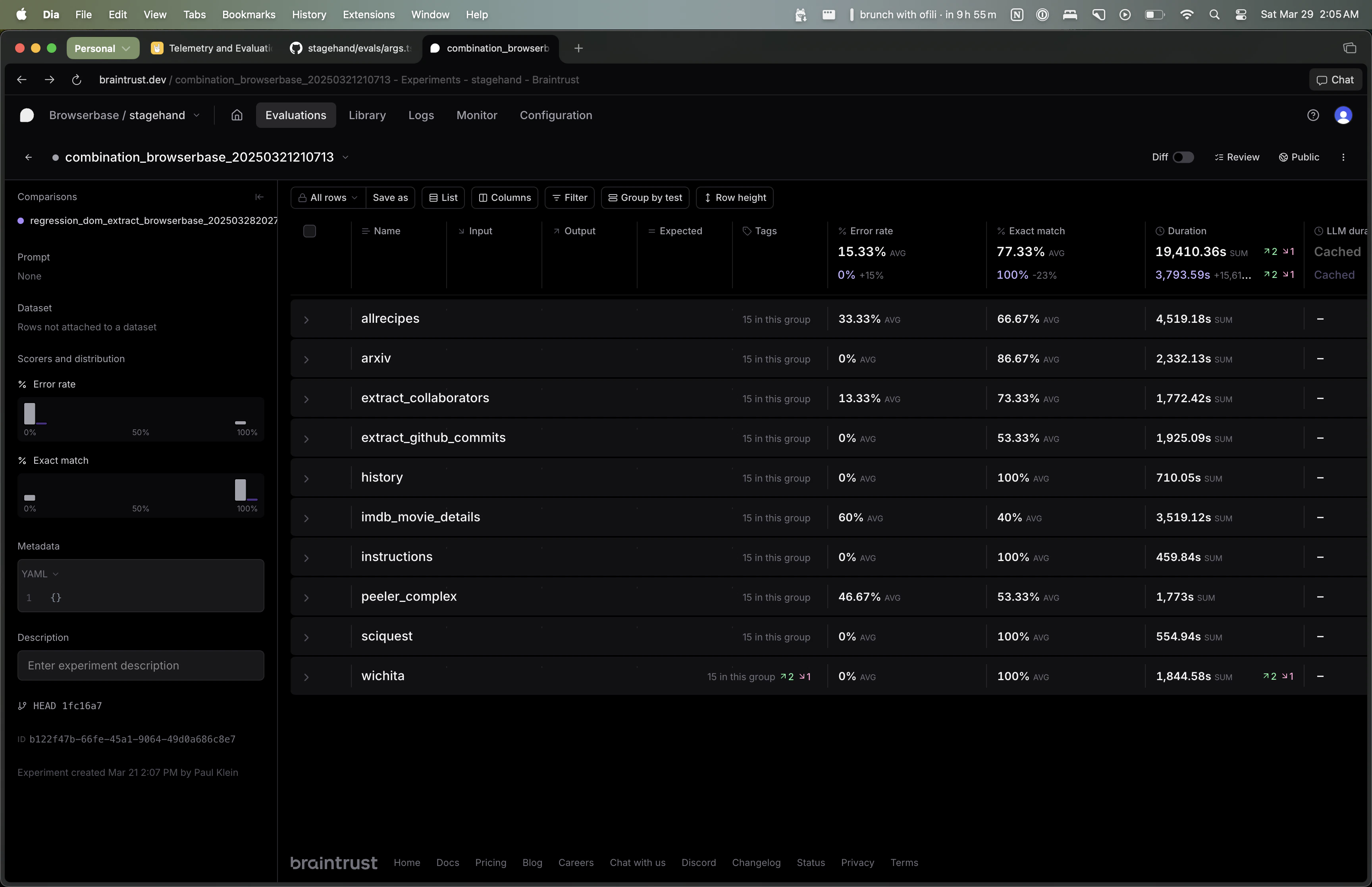 评估结果可在 Braintrust 平台查看。运行 `npm run evals` 时终端会显示对应的 Braintrust URL,通过该链接即可查看特定评估的结果。
默认情况下,每个评估任务会对每个模型运行五次。"Exact Match"列显示评估正确的百分比,"Error Rate"列显示评估出错的百分比。
您可以使用 Braintrust 界面按模型/评估任务进行筛选,并汇总所有评估任务的结果。
#### 添加新评估任务
要添加新评估任务,请在 [`evals/tasks`](https://github.com/browserbase/stagehand/tree/main/evals/tasks) 目录创建新文件,并在 [`evals/evals.config.json`](https://github.com/browserbase/stagehand/blob/main/evals/evals.config.json) 中将其添加到相应的类别。
评估结果可在 Braintrust 平台查看。运行 `npm run evals` 时终端会显示对应的 Braintrust URL,通过该链接即可查看特定评估的结果。
默认情况下,每个评估任务会对每个模型运行五次。"Exact Match"列显示评估正确的百分比,"Error Rate"列显示评估出错的百分比。
您可以使用 Braintrust 界面按模型/评估任务进行筛选,并汇总所有评估任务的结果。
#### 添加新评估任务
要添加新评估任务,请在 [`evals/tasks`](https://github.com/browserbase/stagehand/tree/main/evals/tasks) 目录创建新文件,并在 [`evals/evals.config.json`](https://github.com/browserbase/stagehand/blob/main/evals/evals.config.json) 中将其添加到相应的类别。